Payroll processing is the process of calculating employee wages, withholding required taxes and deductions, paying employees, and keeping accurate payroll records. A proper payroll system also includes worker classification, tax reporting, recordkeeping, payroll policies, and compliance with federal and Florida requirements.
Payroll is more than simply sending employees their paychecks. A complete payroll process connects employee information, hours worked, wages, taxes, deductions, benefits, payments, and required reports.
For a small business, even a simple payroll system can become difficult when the number of employees grows. Errors in employee classification, tax withholding, overtime calculations, or reporting can create extra costs and administrative work.
Businesses looking for payroll processing in Deerfield Beach, FL can use either an in-house system, payroll software, or a professional bookkeeping and payroll provider such as JL Bookkeeping FL LLC.
This guide explains how payroll processing works, what documents are needed, how to classify workers, how to create a payroll policy, how payroll affects cash flow, and how to choose a payroll system.
What Is Payroll Processing?
Payroll processing is the complete process of calculating employee pay, applying deductions and tax withholdings, paying workers, and maintaining payroll records.
A typical payroll process includes:
- Collecting employee information.
- Tracking hours and attendance.
- Calculating regular and overtime wages.
- Adding bonuses, commissions, or other earnings.
- Calculating required tax withholdings.
- Applying employee deductions.
- Calculating employer payroll taxes.
- Reviewing payroll for errors.
- Paying employees.
- Filing required payroll tax reports.
- Maintaining payroll records.
Payroll processing can be performed manually, through payroll software, or with help from a professional payroll service.
For businesses in Deerfield Beach and Fort Lauderdale, the right approach depends on factors such as employee count, pay frequency, business structure, benefits, worker classification, and the amount of payroll support required.
How Does Payroll Processing Work?
Payroll processing follows a series of steps that turn employee work information into accurate paychecks and payroll records.
A simple payroll workflow looks like this:
Employee information → Time and attendance → Gross pay → Taxes and deductions → Net pay → Payroll payment → Tax filings → Recordkeeping
1. Collect employee information
Before processing payroll, the employer needs accurate employee information.
This can include:
- Employee legal name
- Address
- Social Security number
- Employment start date
- Pay rate
- Job title
- Employee classification
- Federal Form W-4
- Benefits information
- Direct-deposit information
- State-required information
- Timekeeping information
2. Calculate gross wages
Gross wages are the employee’s earnings before deductions and tax withholdings.
For an hourly employee:
Hours worked × hourly rate = regular gross wages
If overtime applies, overtime hours must be handled according to applicable wage laws and the employee’s status.
For salaried employees, payroll generally starts with the employee’s established salary for the applicable pay period, subject to applicable rules and adjustments.
3. Calculate deductions and withholdings
Payroll then accounts for required and authorized deductions.
Depending on the employee and business, deductions may include:
- Federal income tax withholding
- Social Security
- Medicare
- Retirement contributions
- Health insurance
- Other authorized deductions
- Wage garnishments where applicable
4. Calculate net pay
Net pay is the amount the employee receives after applicable deductions and withholdings.
Gross pay − deductions and withholdings = net pay
5. Pay employees
Employees may be paid through:
- Direct deposit
- Paper checks
- Other legally permitted payment methods
6. Complete payroll reporting
Employers may also have federal and state payroll reporting responsibilities.
The IRS 2026 Employer’s Tax Guide identifies forms and requirements involving employment taxes, including Form 941, Form 940, W-2 reporting, tax deposits, and recordkeeping.
7. Keep payroll records
Payroll records should be organized and retained for the required period.
The IRS says employment tax records generally must be kept for at least four years.
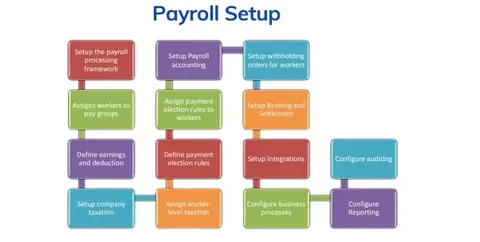
How Do You Set Up a Payroll System?
Setting up payroll starts with identifying the business’s employees, pay structure, tax obligations, payroll schedule, and recordkeeping needs.
Follow these steps to create a basic payroll system.
Step 1: Get an Employer Identification Number
An employer generally needs an EIN when required for employment tax purposes.
The EIN connects the business with its federal employment tax filings.
Step 2: Register for applicable state requirements
Florida employers may have state-level payroll responsibilities.
For example, Florida’s reemployment tax is paid by employers. The Florida Department of Revenue states that the first $7,000 of wages paid to each employee during a calendar year is subject to the state’s reemployment tax.
For 2026, Florida lists a minimum reemployment tax rate of 0.1% and a maximum rate of 5.4%, with new employers generally starting at 2.7% until they establish sufficient experience.
Step 3: Add employees to the payroll system
Create an employee profile for each worker.
Include:
- Legal name
- Address
- SSN
- Hire date
- Pay rate
- Pay type
- Employee status
- Tax information
- Direct-deposit details
- Benefits
- Timekeeping information
Step 4: Collect required forms
Employees should complete the appropriate onboarding documents.
Common documents include:
- Form W-4
- Form I-9
- State or local forms when applicable
- Direct-deposit authorization
- Benefits enrollment documents
- Other employer-required forms
The IRS requires employers to retain Form W-4 records for at least four years.
Step 5: Choose a payroll schedule
Common payroll schedules include:
- Weekly
- Biweekly
- Semimonthly
- Monthly
The best schedule depends on the business’s needs, employee expectations, administrative workload, and applicable law.
Step 6: Create a payroll calendar
A payroll calendar should show:
- Pay-period start date
- Pay-period end date
- Timesheet deadline
- Payroll processing date
- Tax deposit deadlines
- Employee payday
- Reporting deadlines
A calendar reduces the chance of missed deadlines.
Step 7: Test the payroll system
Before running the first live payroll, check:
- Employee information
- Pay rates
- Tax information
- Direct deposit details
- Deductions
- Benefits
- Overtime calculations
- Payroll taxes
- Bank information
A test payroll can identify errors before employees receive incorrect pay.
What Documents Are Required for Payroll?
Payroll requires accurate employee, tax, payment, and employment records.
The exact documents depend on the business and worker, but common payroll documents include:
| Document Name | Document Category | Primary Purpose | Key Features & Attributes | Operational & Compliance Benefit |
|---|---|---|---|---|
| Form W-4 | Tax & Onboarding | Federal income tax withholding information | Captures marital status, dependents, and additional withholding preferences. | Ensures accurate federal tax deductions and prevents tax penalty risks for employees. |
| Form I-9 | Compliance & HR | Employment eligibility verification | Verifies legal identity and employment authorization within the U.S. | Protects organizations from federal audit fines and maintains legal workforce compliance. |
| Form W-9 | Contractor Management | Taxpayer information for payees/contractors | Collects Taxpayer Identification Number (TIN) or SSN of non-employees. | Facilitates accurate end-of-year tax reporting for independent contractors. |
| Direct Deposit Authorization | Payment Processing | Employee payment instructions | Records banking details, routing numbers, and account allocation choices. | Streamlines automated wage disbursements and eliminates physical check handling costs. |
| Time Records | Compensation & Timekeeping | Hours worked and wage calculations | Tracks daily start/end times, breaks, overtime, and total working hours. | Guarantees precise gross pay calculations and satisfies Fair Labor Standards Act (FLSA) rules. |
| Pay Rate Records | Compensation & HR | Documents employee compensation | Details hourly rates, salaries, pay grades, and approved wage changes. | Provides full transparency in payroll accounting and auditing records. |
| Benefits Records | Benefits & HR | Tracks applicable employee benefits | Logs medical, retirement, PTO, and voluntary deduction selections. | Ensures accurate payroll deductions and proper administration of benefit plans. |
| Garnishment Orders | Legal & Payroll | Supports required wage deductions | Mandates legally required deductions like child support or tax levies. | Prevents organizational legal liability by enforcing court-ordered withholdings. |
| Payroll Reports | Financial Analytics | Documents payroll calculations | Summarizes gross-to-net calculations, tax liabilities, and employer costs. | Delivers strategic financial visibility and supports seamless general ledger reconciliation. |
| Form W-2 | Annual Tax Reporting | Reports employee wages and taxes | Aggregates annual gross pay, withheld taxes, and benefit amounts for employees. | Fulfills mandatory IRS reporting requirements and allows employees to file annual taxes. |
| Form 1099-NEC | Annual Tax Reporting | Reports qualifying nonemployee compensation | Details annual payments of $600 or more made to independent contractors. | Ensures IRS compliance and proper documentation of contractor business expenses. |
How Do You Classify Workers for Payroll?
Worker classification determines how a business handles payments, taxes, reporting, and other responsibilities.
The IRS explains that worker classification depends on the actual relationship between the worker and the business, not simply on what the parties call the relationship. The IRS considers behavioral control, financial control, and the relationship of the parties.
What Is an Employee?
An employee generally works under an employer’s direction and control.
Factors may include:
- The business controls how work is performed.
- The business provides instructions.
- The business provides training.
- The worker has an ongoing relationship with the business.
- The business provides employee benefits.
- The worker performs an important part of the business.
What Is an Independent Contractor?
An independent contractor generally operates an independent business and has greater control over how the work is performed.
Factors may include:
- Greater independence
- Significant business expenses
- Ability to serve multiple clients
- Opportunity for profit or loss
- Control over work methods
- Independent business operations
The IRS emphasizes that no single factor automatically determines classification. The entire relationship must be considered.
Why Is Worker Classification Important?
Incorrect classification can lead to:
- Incorrect tax treatment
- Incorrect payroll reporting
- Unpaid employment taxes
- Wage and hour problems
- Additional administrative work
- Potential penalties
Florida also has its own rules for reemployment tax classification. The Florida Department of Revenue states that employers must determine whether a worker is an employee or independent contractor for purposes of correctly reporting employees, and intentional misclassification can have serious legal consequences.
What Is a Typical Payroll Cycle?
A payroll cycle is the period used to calculate and pay employee wages.
For example, a biweekly payroll schedule may cover 14 days of work and pay employees every two weeks.
Weekly payroll
Employees are paid once each week.
Advantages:
- Frequent employee payments
- Shorter gap between work and payment
Challenges:
- More payroll processing
- More administrative work
- More frequent payroll-related tasks
Biweekly payroll
Employees are paid every two weeks.
Advantages:
- Predictable schedule
- Common for many employers
- Manageable payroll workload
Challenges:
- Some months have three paydays
- Payroll dates need careful calendar planning
Semimonthly payroll
Employees are paid twice each month.
For example:
- 15th
- Last day of the month
Advantages:
- Two payrolls per month
- Predictable monthly planning
Challenges:
- Pay periods can contain different numbers of workdays
- Payroll calculations may require careful scheduling
Monthly payroll
Employees receive one payment each month.
This can simplify administration, but employers must follow applicable federal and state wage-payment requirements.
How Does Payroll Affect Cash Flow?
Payroll affects cash flow because employee wages, employer payroll taxes, benefits, and other payroll costs must be funded on time.
Payroll should therefore be included in regular cash-flow planning.
Payroll costs can include:
- Employee wages
- Employer Social Security taxes
- Employer Medicare taxes
- Federal unemployment tax
- Florida reemployment tax
- Employee benefits
- Retirement contributions
- Payroll service fees
- Workers’ compensation costs
- Other employment-related expenses
Why should payroll be included in cash-flow planning?
A business may have strong sales but still experience cash-flow pressure if payroll is not planned correctly.
Businesses should know:
- How much payroll costs each cycle
- When employees must be paid
- When payroll taxes must be deposited
- When benefits must be funded
- When quarterly reports are due
Florida requires liable employers to file quarterly reemployment tax reports. The Florida Department of Revenue lists quarterly deadlines of April 30, July 31, October 31, and January 31.
Good payroll planning helps a business keep enough cash available for both employee payments and employer obligations.
What Payroll Regulations Should Businesses Know?
Payroll regulations come from several sources, including the IRS, U.S. Department of Labor, and Florida agencies.
Important areas include:
- Employee classification
- Minimum wage requirements
- Overtime requirements
- Tax withholding
- Employment taxes
- New-hire reporting
- Recordkeeping
- State reemployment tax
- Employment eligibility verification
- Wage deductions
The U.S. Department of Labor states that employers covered by the Fair Labor Standards Act generally must preserve payroll records for at least three years and records used to calculate wages for at least two years.
The IRS has a separate employment-tax recordkeeping requirement of at least four years, so businesses should organize records according to the applicable requirements rather than relying on one universal retention period.
What Are the Florida Payroll Requirements for Employers?
Florida employers may have federal and state payroll responsibilities, even though Florida does not impose a broad individual state income tax.
Important Florida payroll areas include:
Florida reemployment tax
Florida’s reemployment tax is an employer-paid tax that helps fund unemployment benefits.
Only the first $7,000 of wages paid to each employee in a calendar year is subject to this tax.
New-hire reporting
Florida provides an online system for employers to report new hires and certain other worker information.
The Florida Department of Revenue’s employer system supports reporting new hires, terminations, separations, and certain bonus or lump-sum payments.
E-Verify
Florida law also includes employment eligibility verification requirements.
The Florida Department of Revenue states that private employers with 25 or more employees are required to use E-Verify for newly hired employees, subject to the applicable statutory requirements.
Because employment laws can change, businesses should verify current requirements with the appropriate government agency or qualified professional.
How Does New-Hire Reporting Work in Florida?
Florida new-hire reporting requires employers to provide required information about newly hired or rehired workers.
The Florida Department of Revenue provides online and electronic reporting options.
Information may include:
- Employee name
- Address
- Hire date
- Employer information
- Federal Employer Identification Number
- Required worker identification information
Payroll providers and service bureaus can also support new-hire reporting.
This is one reason businesses may search for a payroll service in Deerfield Beach, FL when they want payroll administration handled as part of a broader bookkeeping process.
How Should a Business Create a Payroll Policy?
A payroll policy explains how employees are paid and how payroll information is handled.
A clear policy can reduce confusion and help employees understand payroll procedures.
A payroll policy can explain:
- Pay frequency
- Paydays
- Timekeeping rules
- Timesheet deadlines
- Overtime procedures
- Payroll corrections
- Direct deposit
- Deductions
- Bonuses
- Commissions
- Paid time off
- Payroll questions
- Employee responsibilities
- Manager approval requirements
Why is a payroll policy useful?
A written policy gives employees a consistent reference point.
For example, the policy can explain when timesheets must be submitted and who approves them.
It can also explain how an employee should report an incorrect paycheck.
How Can You Improve Your Payroll Process?
The best way to improve payroll is to make the process consistent, documented, reviewed, and as automated as practical.
Use a payroll checklist
A checklist can include:
- Review new employees
- Review terminated employees
- Confirm hours
- Check overtime
- Review pay changes
- Check bonuses
- Review deductions
- Review tax calculations
- Approve payroll
- Submit payments
- Confirm tax deposits
- Save reports
Use electronic timekeeping
Electronic timekeeping can reduce manual calculations and make it easier to review employee hours.
The Department of Labor allows employers to use different timekeeping methods as long as the records are complete and accurate.
Separate payroll duties
When practical, different people can handle:
- Time approval
- Payroll preparation
- Payroll review
- Payment authorization
This creates additional review points.
Reconcile payroll
After payroll is processed, compare payroll reports with:
- Bank transactions
- General ledger
- Payroll liabilities
- Tax payments
- Employee payment records
Keep payroll records organized
A well-organized system makes it easier to answer employee questions, prepare reports, and respond to tax or regulatory requests.
What Payroll Errors Should Businesses Avoid?
Common payroll problems often come from incorrect or outdated information.
Important errors to avoid include:
Incorrect employee classification
Do not classify workers only according to a contract title or how they prefer to be paid. The IRS says classification depends on the actual relationship and control factors.
Incorrect pay rate
Every employee’s current pay rate should be verified before payroll is processed.
Missing overtime
For nonexempt employees covered by the FLSA, applicable overtime rules must be followed.
Incorrect deductions
Deductions should be properly authorized and handled according to applicable law.
Missing tax deadlines
Payroll taxes should not be treated as ordinary cash available for other business expenses.
Poor recordkeeping
Businesses should maintain payroll documents in an organized and secure system.
Manual data-entry mistakes
Repeated manual entry increases the chance of errors in:
- Hours
- Pay rates
- Employee information
- Deductions
- Bank details
How Do You Choose a Payroll System or Software?
Choosing payroll software should start with the business’s actual payroll needs rather than the number of features advertised by a software company.
Consider these factors:
| Feature | Basic Payroll Software | Professional Payroll Service | Key Strategic Benefit |
|---|---|---|---|
| Wage Calculations | Usually automated | Managed with professional support | Ensures error-free compensation calculations with dedicated expert review. |
| Tax Calculations | Usually automated | Usually handled as part of service | Minimizes tax penalty risks through proactive full-service compliance. |
| Payroll Processing | Self-managed | Provider-assisted or managed | Saves significant administrative time by delegating core payroll execution. |
| Recordkeeping | Software-based | Organized through service and software | Maintains centralized, audit-ready compliance records across systems. |
| New-Hire Support | Depends on provider | May be included | Streamlines employee onboarding with integrated setup and reporting. |
| Human Support | Varies | Usually available | Delivers immediate access to dedicated payroll specialists when issues arise. |
| Customization | Depends on software | Can be tailored to business needs | Adapts seamlessly to unique business structures, pay rules, and workflows. |
| Best Fit | Businesses comfortable managing payroll internally | Businesses wanting outside payroll support and expert oversight | Aligns payroll operations with internal resources and growth priorities. |
What Should You Look for in a Payroll Service?
When comparing payroll providers, look beyond the advertised price.
Ask the provider:
- What payroll tasks are included?
- Who handles payroll tax calculations?
- Who handles payroll tax filings?
- How are new hires reported?
- How are payroll errors corrected?
- What happens if a payroll deadline is missed?
- Is direct deposit available?
- How are payroll records stored?
- Can the provider work with existing bookkeeping software?
- What support is available when an employee has a payroll question?
A business searching for payroll services near me may find many options, but proximity alone should not determine the choice.
Instead, compare the provider’s services with the business’s payroll needs.
What Are the Benefits of Professional Payroll Processing?
Professional payroll processing can reduce the amount of administrative work a business owner has to handle internally.
1. Less manual work
A professional provider can help organize recurring payroll tasks.
2. Better process consistency
A defined payroll workflow can make each payroll cycle more predictable.
3. Payroll record organization
Payroll documents and reports can be maintained as part of a structured process.
4. Support with payroll compliance
A payroll professional can help identify payroll-related requirements and deadlines, although businesses should verify legal and tax requirements that apply to their specific situation.
5. More time for business operations
Business owners can spend less time entering payroll data and reviewing routine payroll tasks.
6. Easier payroll scaling
As a business adds employees, payroll can become more complex. A structured payroll process can make growth easier to manage.
What Is the Difference Between Payroll Processing and Bookkeeping?
Payroll processing focuses specifically on employee compensation and related payroll obligations, while bookkeeping records the business’s broader financial transactions.
Payroll processing includes:
- Employee wages
- Payroll taxes
- Deductions
- Benefits
- Paychecks
- Payroll reports
- Payroll records
Bookkeeping includes:
- Income
- Expenses
- Bank transactions
- Accounts payable
- Accounts receivable
- Financial categorization
- Bank reconciliation
- Financial reports
The two functions are connected.
For example, payroll expenses recorded during payroll processing must also be reflected correctly in the business’s accounting records.
This is why many businesses use bookkeeping and payroll services together.
How Can Online Payroll Services Help Small Businesses?
Online payroll services near me can provide businesses with a digital way to manage payroll without relying entirely on paper records or manual calculations.
Depending on the provider, online payroll systems may offer:
- Employee portals
- Direct deposit
- Digital pay stubs
- Payroll reports
- Tax calculations
- Time tracking
- Payroll calendars
- Integration with accounting software
- Electronic recordkeeping
Online tools can be useful, but automation does not eliminate the need for accurate employee data.
Incorrect hours, pay rates, worker classification, or employee information can still produce incorrect payroll.
When Should a Business Consider Advanced Payroll Services?
Businesses may need more advanced payroll support as payroll becomes more complicated.
Advanced payroll services in Fort Lauderdale may be useful for businesses with:
- Multiple employees
- Different pay rates
- Overtime
- Bonuses
- Commissions
- Multiple benefit plans
- Frequent employee changes
- Independent contractors
- Multiple locations
- Complex bookkeeping requirements
The exact level of service should match the business’s payroll complexity.
A company with three employees and simple salaries may need a very different system from a growing company with hourly workers, commissions, benefits, and multiple payroll categories.
How Much Does Payroll Processing Cost?
Payroll processing costs vary based on the payroll provider, employee count, pay frequency, services included, and payroll complexity.
Common pricing structures may include:
- Monthly subscription
- Per-employee pricing
- Per-payroll pricing
- Base fee plus per-employee charges
- Custom professional-service pricing
Businesses should compare the total cost, not just the advertised base price.
For example, a low starting price may not include:
- Tax filing
- Year-end forms
- New-hire reporting
- Payroll corrections
- Direct deposit
- Time tracking
- Professional support
Before choosing a provider, request a complete explanation of what is included.
What Is the Best Payroll Service for a Small Business?
There is no single payroll system that fits every business because payroll needs vary by company size, worker type, pay structure, and administrative requirements.
Instead of choosing a provider only because it advertises itself as the best payroll service in Fort Lauderdale, businesses should compare practical factors such as:
- Payroll features
- Tax support
- Employee support
- Software integration
- Reporting
- Pricing
- Security
- Customer service
- Business size
- Payroll complexity
A good payroll solution should fit the business rather than force the business into an unnecessarily complicated process.
How Does Payroll Processing Support Cash-Flow Planning?
Payroll data can help business owners understand one of their largest recurring operating costs.
A payroll report can show:
- Total gross wages
- Employer taxes
- Employee deductions
- Benefits
- Net payroll
- Payroll liabilities
This information can be used alongside bookkeeping reports to understand upcoming cash requirements.
A simple payroll cash-flow calendar can show:
| Payroll Item | Key Planning Question | Standard Timing & Frequency | Primary Operational & Financial Benefit |
|---|---|---|---|
| Employee Wages | When must employees be paid? | Weekly, bi-weekly, semi-monthly, or monthly schedule | Maintains state labor law compliance and ensures steady employee trust and morale. |
| Payroll Taxes | When must deposits be made? | Semi-weekly or monthly (per IRS deposit schedule) | Prevents costly tax penalties and interest charges through timely federal tax remittance. |
| Benefits | When must premiums or contributions be funded? | Monthly carrier billing dates or per pay period (401k) | Guarantees uninterrupted health coverage and protects employee retirement plan compliance. |
| Florida Reemployment Tax | When is the quarterly report/payment due? | Quarterly (End of month following quarter-end) | Ensures full state compliance and avoids late filing fees with the Florida Dept. of Revenue. |
| Payroll Service | When is the provider fee charged? | Per pay period run or monthly billing cycle | Provides predictable administrative budgeting and seamless vendor service continuity. |
| Bonuses | When are additional payments expected? | Scheduled annual, quarterly, or performance-based windows | Allows proactive cash flow forecasting and aligns incentive payouts with fiscal goals. |
This approach helps businesses avoid treating payroll obligations as unexpected expenses.
How Does Payroll Recordkeeping Work?
Payroll recordkeeping means maintaining the documents and data needed to support payroll calculations, tax reporting, employee payments, and compliance.
The IRS says employment tax records should generally be retained for at least four years.
The Department of Labor separately states that FLSA payroll records generally must be retained for at least three years, while records used to calculate wages should generally be retained for two years.
Businesses should therefore create a retention system that meets the applicable requirements.
Payroll records may include:
- Employee information
- W-4 forms
- Payroll registers
- Pay stubs
- Time records
- Tax filings
- Tax deposit confirmations
- W-2 records
- Payroll adjustment records
- Benefits records
- Garnishment records
- Direct-deposit records
Digital storage can make these records easier to organize and retrieve.
How Can JL Bookkeeping FL LLC Help With Payroll Processing?
JL Bookkeeping FL LLC provides bookkeeping-related support for businesses that need help organizing their financial processes, including payroll-related services.
For businesses in Deerfield Beach and Fort Lauderdale, professional support can help create a consistent payroll workflow.
A payroll support process may include:
- Employee payroll setup
- Payroll calculations
- Payroll record organization
- Payroll reporting support
- Payroll bookkeeping
- Payroll-related reconciliation
- Assistance with recurring payroll procedures
The exact services should be confirmed based on the business’s needs and service agreement.
For a business that does not want to manage every payroll task internally, professional assistance can provide a more structured way to handle recurring payroll responsibilities.
What Should a Small Business Do Before Its First Payroll?
Before the first payroll run, complete a payroll setup checklist.
Payroll setup checklist
Business information
- Obtain required federal identification.
- Register for applicable state requirements.
- Establish payroll accounts.
Employee information
- Collect required employee information.
- Complete applicable employment forms.
- Confirm employee classification.
- Enter pay rates.
Payroll configuration
- Choose pay frequency.
- Set pay periods.
- Establish payroll deadlines.
- Configure deductions.
- Configure benefits.
- Set up direct deposit if used.
Compliance
- Review applicable federal requirements.
- Review Florida requirements.
- Establish new-hire reporting procedures.
- Create recordkeeping procedures.
Testing
- Test payroll calculations.
- Verify tax information.
- Verify bank information.
- Review sample pay statements.
- Confirm payroll reports.
Once these steps are complete, the business can begin its regular payroll cycle.
Frequently Asked Questions
What is payroll processing?
Payroll processing is the process of calculating employee wages, withholding applicable taxes and deductions, paying employees, filing required reports, and maintaining payroll records.
How often should payroll be processed?
Payroll may be processed weekly, biweekly, semimonthly, or monthly, depending on the employer’s payroll schedule and applicable requirements.
What documents are needed for payroll?
Common payroll documents include Form W-4, Form I-9, employee identification information, pay-rate records, time records, direct-deposit information, benefits records, and applicable tax documents.
Can a payroll service handle payroll taxes?
Many payroll providers offer payroll tax calculation, reporting, and filing services. Businesses should confirm exactly which tax filings and payments are included before selecting a provider.
Conclusion
Payroll processing involves much more than calculating employee pay. A complete payroll system includes employee setup, worker classification, time tracking, wage calculations, tax withholding, payroll payments, reporting, cash-flow planning, and accurate recordkeeping.
For businesses seeking payroll processing in Deerfield Beach, FL, a structured payroll process can make recurring payroll work easier to manage and review. Businesses in Deerfield Beach and Fort Lauderdale can also compare professional payroll support with software-based options based on their size and payroll complexity.
JL Bookkeeping FL LLC can help businesses build a more organized approach to bookkeeping and payroll-related processes. Contact JL Bookkeeping FL LLC to discuss your business’s payroll needs and create a payroll process that fits your operations.